
The short version
Google Ads is probably chasing form fills, not booked jobs. Send the appointments that actually landed on the schedule back into Ads and make that the goal it bids toward; then judge the campaign by cost per booked job over the next few weeks.
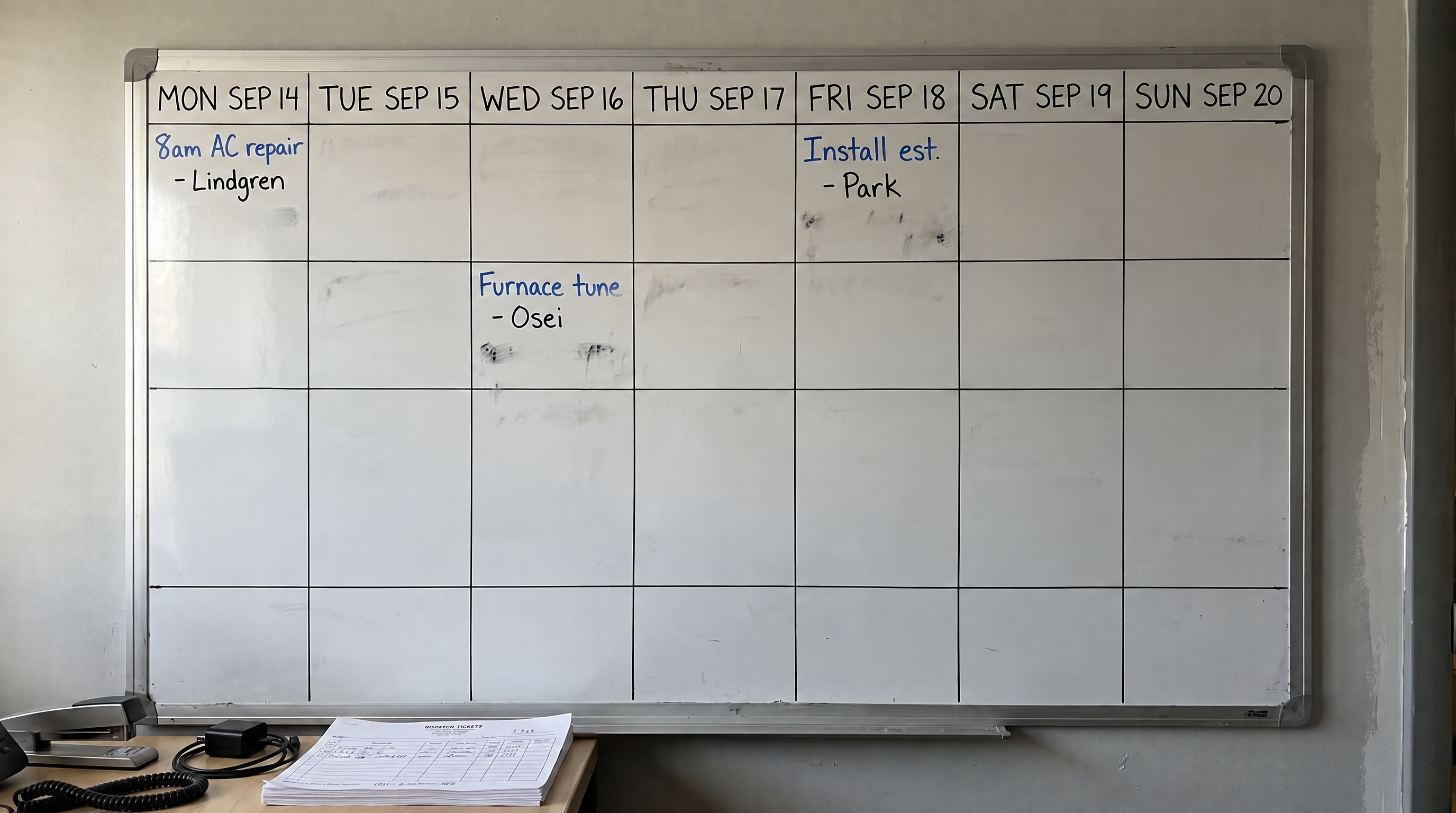
An HVAC company running search ads on Google kept watching the win column in the ad account climb — the one Google labels Conversions — while the wall whiteboard stayed thin. About $8,400 a month in spend. Roughly ninety form fills. Maybe eighteen jobs that actually landed on the schedule. Cost per form looked fine. Cost per booked job did not. Nobody had named that gap out loud yet.
In Google Ads, each outcome you track — a form fill, a call, a booked appointment — is a conversion action: one named row that tells Google what happened after the click. Google optimizes toward the goal you set for the campaign; it takes a main goal and lets you name a second one to watch; those are what Google calls Primary and Secondary. Primary is the finish line bidding may chase. Secondary is watch-only unless a later exception pulls it back into bidding.
Open the account and read two things together: (1) which conversion actions are Primary for the account goal, and (2) which conversion goal and bidding strategy each campaign actually uses. If Submit lead form is the action campaigns optimize to and Booked job is missing or unused for bidding, the machine is buying contacts. You are not failing at ads. You are winning at the wrong finish line — one likely configuration gap, not proof that the return path from booked appointments, calls, intake, or attribution is clean.
Read the Goals to Conversions screen the same way: Booked job set as Primary and Submit lead form as Secondary. That screen is the finish-line check before you spend more. The labels on the named rows matter more than any soft number in a Value or Conversions cell next to them.
Tell Google to chase booked jobs, not form fills.
Primary and Secondary decide which outcomes Google's automated bidding — what Google calls Smart Bidding — may treat as the finish line — they are not vanity labels.
Google groups conversion actions into conversion goals. For each action inside a goal you choose Primary or Secondary (observe only). Primary actions appear in the Conversions column and feed bidding when the campaign optimizes to the goal that contains them. Secondary actions land in All conversions for observation. They do not drive bids on their own. A custom goal is a hand-picked mix of actions you attach to one campaign instead of the account default. When a Secondary action sits inside a custom goal and the campaign selects that custom goal, Google uses the action for bidding and reporting even though the action itself is still marked Secondary (Google Ads Help: primary and secondary; About conversion goals).
That custom-goal exception is the point. Submit lead form can look "safe" as Secondary on the Goals summary, then a campaign-specific custom goal quietly pulls it back into bidding. The Conversions column stays busy. The whiteboard does not. Campaign-specific goals can override account-default goals, and you can attach only one custom goal per campaign, so the mix you pick is the mix that steers (About campaign-specific conversion goals).
Two conditions have to be true for an action to steer a campaign: the action is Primary (or Secondary inside a selected custom goal), and the campaign actually uses the goal that contains it. A Primary Booked job sitting in a goal no campaign selected does not bid. A Primary Submit lead form on the goal every Search campaign uses does. Google also warns that misconfiguring Primary and Secondary can keep Smart Bidding from optimizing effectively, because the algorithm learns from the signals you mark as biddable.
So when you open Goals to Conversions, you are not auditing a report. You are reading which outcomes the account is allowed to buy.
Same money, more jobs on the board.
They kept Submit lead form as Secondary / watch-only so the office could still see volume. They made Booked job the Primary conversion for the goal campaigns bid on. They started sending accepted appointments back into Google Ads every week. Spend stayed in the same band. The shape of the month did not.
| Before (Submit lead form primary) | After (Booked job primary) | |
|---|---|---|
| Monthly spend | ~$8,400 | ~$8,200 |
| Form fills | ~90 | ~62 |
| Booked jobs | ~18 | ~29 |
| Cost per booked job | ~$467 | ~$283 |
Form fills fell. Booked jobs rose. Cost per booked job got healthier. Cost per lead looked worse for a stretch. The recorded change behind that booking-rate lift is the finish-line switch plus steadily sending accepted appointments back into Ads, not a claim that nothing else in the market moved.
One Tuesday night they pulled the Conversions column next to the whiteboard for the same week. The column showed twenty-four Submit lead form events. The calendar showed four accepted appointments that could still be tied to those clicks. The other twenty were real contacts with no booked job behind them. That single comparison made the primary switch feel urgent instead of theoretical.
Ignore the cost per lead getting worse for a few weeks.
That stretch is where owners kill the fix. Cost per lead climbs on the agency report. Someone says the campaign is "underperforming." The instinct is to flip Primary back to Submit lead form so the Conversions column looks busy again. Doing that can send Smart Bidding back toward soft contacts. Hold Booked job as the bid signal while you judge cost per booked job and campaign status, not day-one cost per form.
Google's Help on primary and secondary actions describes a standard 7-14 day learning phase after material changes, and tells you to avoid frequent budget, target (CPA or ROAS), or conversion-goal edits in that window because they reset learning (Google Ads Help: primary and secondary). Separate Smart Bidding guidance frames the relearn as about one or two conversion cycles in most cases; thin Booked job volume stretches it (Changing conversion goals and actions used for Smart Bidding; Duration of the learning period). Treat those ranges as guidance, not a calendar promise. Change the finish line once, send booked outcomes back into Ads, then judge jobs that stick to the whiteboard.
Put one real booked job into Google before you change anything.
Write the rule so the office and the ad account agree on one sentence:
Booked job fires when the homeowner accepts a dated appointment on the schedule (not when the form submits, not when a tech marks the job complete).
An import here means sending a booked appointment back into Google Ads so the click that led to it gets credit — usually a file or connection that carries the click ID and the booking time. Google's offline conversion import path is a documented route from that booking record back into Ads (About offline conversion imports; Import conversions from ad clicks):
- On the ad click, capture the Google Click ID (GCLID) and keep it with the lead.
- When the appointment is accepted, record Booked job with the conversion time.
- Import that outcome through offline conversion import, or through enhanced conversions for leads (hashed email or phone plus the click ID when you have it). Google recommends enhanced conversions for leads as the upgraded path (About enhanced conversions for leads).
- Confirm success two ways before you trust the column for bidding: upload status, and the conversion visible under Booked job in Google Ads reports. A clean connection test is not the same as enough Booked job volume for Smart Bidding to steer hard.
Conversion Name on the import must match the action name in Google Ads exactly. Leave Conversion Value blank if you want Google Ads to use the value set on the Booked job action; if you bid to conversion value, put your real booked-appointment rules. Do not invent a dollar figure that pretends a booked job is worth one dollar.
Imported rows can take a day or two to show in reports, so a same-day blank cell is not proof the file failed. Check Goals to Conversions to Uploads for Status and Results, and use diagnostics when you run enhanced conversions for leads.
Google has published a median 10% conversion lift for advertisers who used first-party data alongside click IDs in offline import versus standard offline imports — what Google published for that cohort, not a bidding promise for your company. Ask your media person to show recent booked jobs were imported and visible in Google Ads, without exposing homeowner data. If they cannot, the schedule and the ad account are still living in different rooms.
Skip this fix when the office or the phone is the real leak.
Conversion volume too thin for your Smart Bidding strategy. Keep capturing click IDs and importing what you have, but do not expect the automated strategies that chase a target cost per booked result or the most conversions possible — Target CPA / Maximize conversions — to steer hard on a sparse Booked job signal. Manual or limited bidding while you build the return path is honest.
Phone-heavy demand that forms cannot carry. Track calls into the same booked outcome when the office books from a call, or you will train on a slice of demand.
An office that empties the calendar with "perfect" bidding. If intake is slow, quotes drag, or no-shows are high, fix the office leak first or you will import a thin book and teach Google that thin is normal.
Inside a learning stretch after a goal or conversion change. Soft contact volume can dip. Judge booked jobs that stick to the whiteboard after the account has real Booked job volume to learn from, and avoid stacking more goal changes mid-window.
Run these five checks tonight.
You do not need a new campaign. You need a written finish line, a working return path, and five checks you can finish in one sitting. Each step is one screen — screenshot it so tomorrow's argument is about the schedule, not memory.
Write down every outcome Google is allowed to bid on
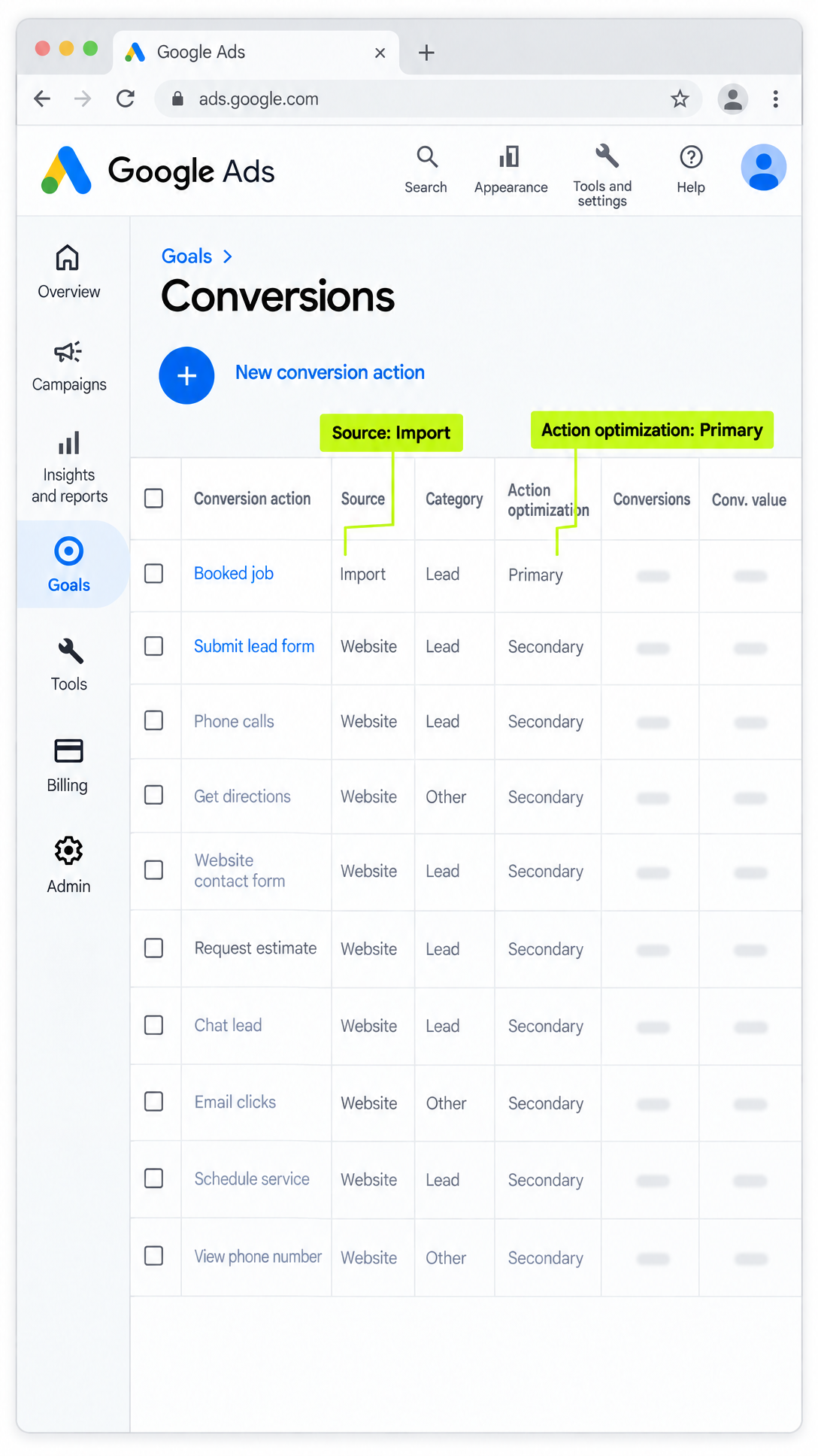
Open Goals → Conversions → summary table. Write down every conversion name and whether it is Primary or Secondary — using the finish-line choice above. Find Booked job and Submit lead form (or your account's form-fill name). Ignore soft Value and Conversions cells you do not already trust from your own books. The question is binary: which actions may bid, and which are watch-only.
If Booked job is missing, create the offline (or enhanced-for-leads) action before you touch Primary settings. If Submit lead form is Primary and Booked job is Secondary or absent, you have already found the likely gap.
Check each campaign for a soft contact still driving bids
Open each active Search campaign's settings and expand Conversion goals. Note account-default vs campaign-specific goals, the bidding strategy, and which actions sit inside the selected goal — including any custom goal. A Secondary Submit lead form inside a custom goal the campaign selected still bids (the custom-goal exception explained earlier). Write that exception next to the campaign name if you find it.
This step catches the "we already set Booked job Primary" story that fails because one campaign never selected the goal, or because a custom goal reopened the soft contact.
Prove one real booked job made it back into Google
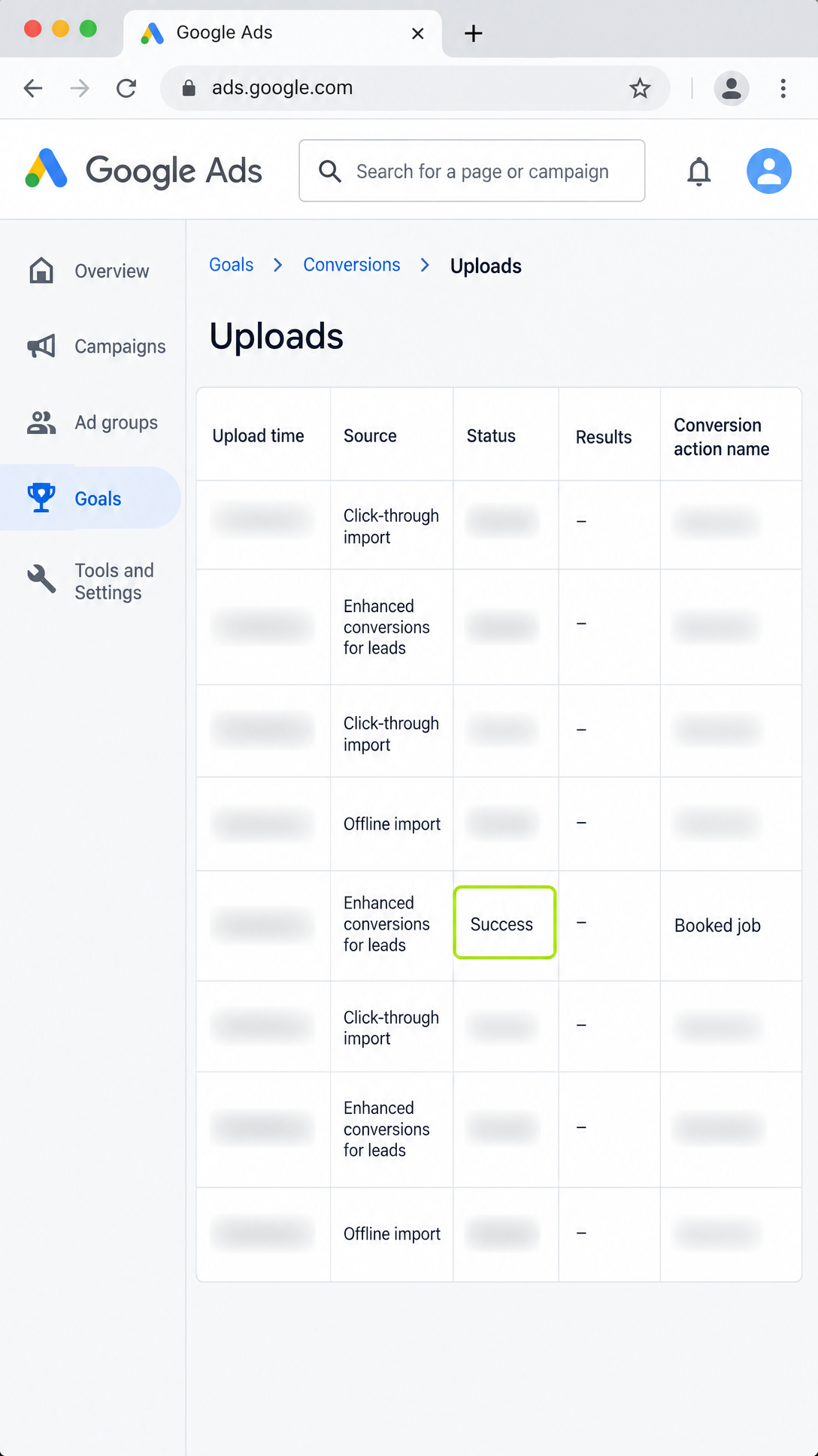
Before you promote Booked job to Primary, prove one real accepted appointment made it back into Ads. Capture GCLID (and hashed email or phone if you use enhanced conversions for leads), import the row with Conversion Name exactly Booked job and a conversion time, then confirm Uploads status and a Conversions view filtered to Booked job where the event appears. Soft numbers on other rows do not count. One visible Booked job event does.
A green connection check without a visible Booked job conversion is not bidding readiness. Wait out the usual processing window if the file just landed.
Then make booked jobs the finish line and form fills watch-only
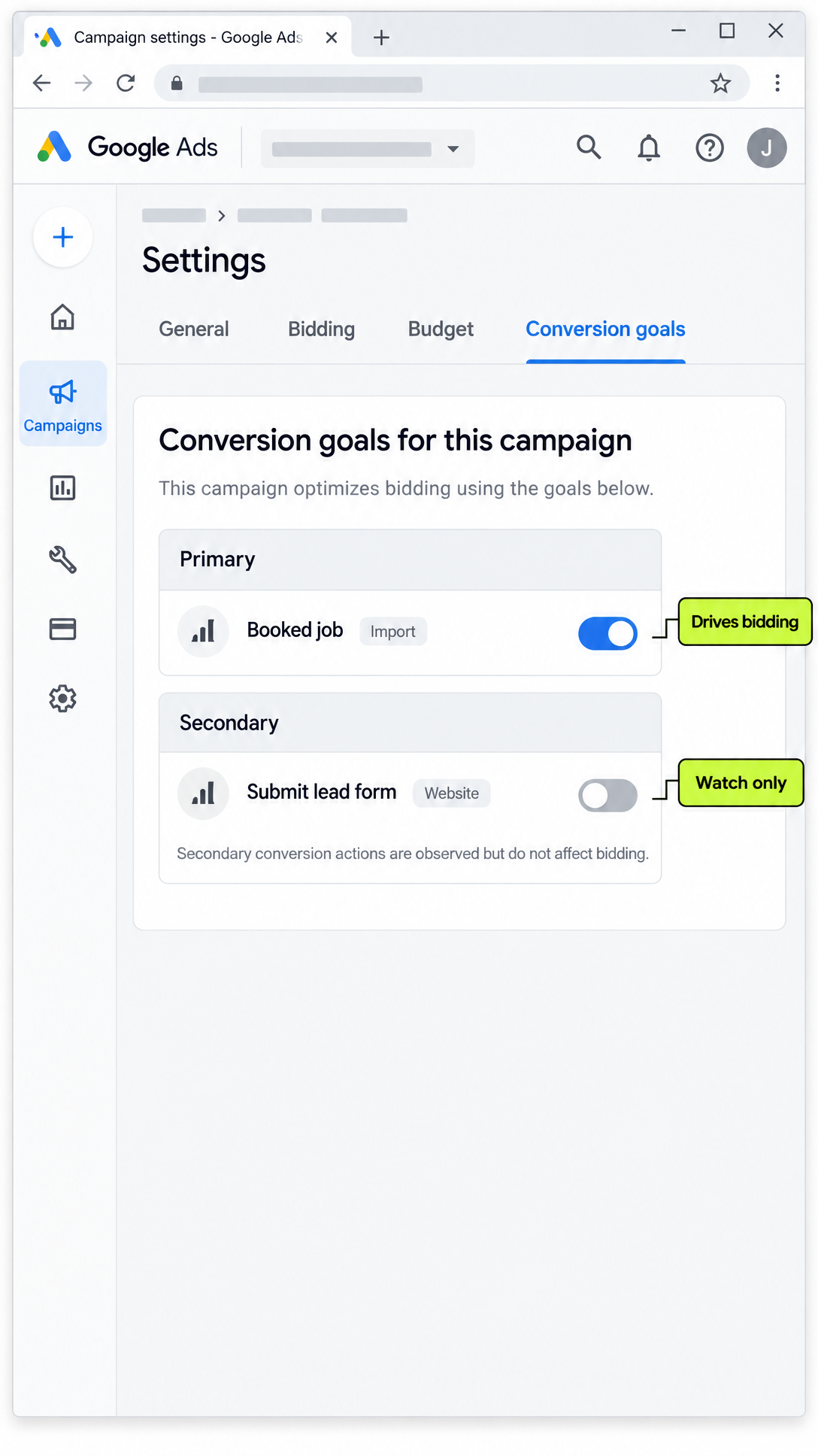
Only after the import is visible, set Booked job to Primary and Submit lead form to Secondary (observe only), unless you documented a deliberate custom-goal exception in step 2 and still want it. Save. Re-open Goals to Conversions and confirm the labels flipped.
Do not flip Primary first and import later. Prove one Booked job import is visible before you promote Booked job to Primary or rely on it for bidding.
Judge by booked jobs for the next few weeks
Keep columns for Cost and Conversions for Booked job (not form-fill vanity alone). Watch bid-strategy status for Learning after the goal change. Soft day-one cost-per-lead spikes can happen when the finish line moves down-funnel. Hold the Primary setting through the learning guidance above, keep weekly imports flowing, and judge cost per booked job against the whiteboard.
Avoid frequent mid-window budget, target, or goal changes — those can reset Learning. Protect the window.
Trust the whiteboard first.
Trust the schedule first. Then trust Booked job volume you can tie to accepted appointments. Then trust cost per booked job once Smart Bidding has had real Booked job events to learn from. Soft contact volume can fall while booked work rises, the same pattern as the table above. That is not automatically failure. That can be the machine finally buying the finish line you named.
That loop — send real outcomes back into the systems that buy attention, then adjust from what actually booked — is how a connected marketing operation keeps improving. Axis37 is built around that loop across search, local presence, the site, and the signals that follow a click, not around a website alone.
If you want a plain-English read on website gaps, local search presence, AI answer visibility, and tracking before you pour more money in, Get My Search Checkup.
Tonight, open Google Ads and write down every conversion name allowed to bid and which goal each campaign uses. If Booked job is not the signal campaigns optimize to, you have found one concrete place the Conversions column and the whiteboard can disagree. Fix the return path, set the finish line, then spend.
Frequently asked.
What is the difference between Primary and Secondary conversion actions?
Primary actions report in the Conversions column and are used for bidding when their goal is used for bidding. Secondary actions are for observation in All conversions, unless a Secondary action sits inside a custom goal the campaign selects.
When should Booked job become the Primary conversion?
After you can import at least one accepted appointment and see it under the Booked job action. Then set Booked job Primary and Submit lead form Secondary unless you have a deliberate custom-goal exception.
Is a clean offline import connection enough for Smart Bidding?
No. A connection or diagnostics check is not the same as enough Booked job volume for Smart Bidding to steer. Confirm uploads and visible Booked job conversions, then judge through the next few weeks.
How long should I wait after changing conversion goals?
Google Help often frames about 7-14 days or 1-2 conversion cycles after material goal or conversion changes. Duration still depends on conversion volume and delay. Avoid stacking more goal edits mid-window.
What if most jobs are booked from phone calls, not forms?
A form-only Booked job chain under-counts. Track calls into the same booked outcome when the office books from a call, or bidding will train on only a slice of demand.